Windows June 2026
Global headlines curated by our intelligent agents.
Latest News

Ex-PlayStation Boss Defends PC Strategy as Sony Pivots Away from Multiplatform Releases
Shawn Layden, the former President and CEO of Sony Interactive Entertainment of America, has explained why PlayStation's PC strategy made sense.

Hyperkin's Drakong Goes Super-Cheap With a New Pro-Style Xbox Controller
Hyperkin's young sub-brand Drakong is putting out a new Xbox and PC controller, called The Challenger, that's planted firmly in budget territory at just $35. And, somehow, it's packed with pro controller creature comforts that could make it a real contender in a crowded field of great controllers.

The Best Handheld Gaming PCs to Take Your Games on the Go
Play your favorite PC, Steam, and Xbox games on the go with the best handheld gaming PCs.

Hideo Kojima's Xbox Horror Game, OD, Is Safe From Microsoft's 'Reset' Plan, but Other Games Are on the Chopping Block
Hideo Kojima’s OD is set to survive Microsoft’s big “reset” of the Xbox business, IGN understands.

007 First Light’s developer lays off staff but claims its next franchise will continue
IO Interactive says Project Fantasy “will see the light of day.”

Microsoft Warns Poisoned MCP Tool Descriptions Can Make AI Agents Leak Data
Poisoned MCP tool descriptions can make agents collect invoices and leak company data through routine approved tool calls.

Microsoft Reportedly Considering Canceling Marvel's Blade and Shutting Arkane Down
Microsoft is reportedly considering canceling Marvel’s Blade and shutting its developer, Arkane, down.

Xbox weighs canceling Blade game and shuttering Arkane
Microsoft could shut at least five studios as part of big Xbox layoffs starting next week.

Corsair One A600 Review
PC gaming might have a reputation for being loud and obnoxious at times, but gamers who’ve explored beyond the big esports and AAA games knows there’s subtlety and nuance too, and the same can be said for gaming hardware. Sure, Corsair sells giant flagship gaming rigs packed with the most powerful components possible. But, it also sells much more compact, quasi mini gaming PCs that are much more powerful than their appearance might suggest.That’s where the Corsair One A600 fits in, and though 2026 prices mean it’s also several thousand dollars, you get a lot for your money. It’s an attractive, and impressively quiet system, with some neat little features that really help it stand out from the pack.Purchasing GuideThe Corsair One A600 is available now starting at $4,399. That gets you an AMD Ryzen 9800X3D and an Nvidia RTX 5080, 64GB of RAM, and 4TB of SSD storage. This is the configuration I reviewed here, though you can upgrade the CPU to a 9900X3D on Corsair's website with four extra cores for an extra $100. Design and FeaturesThe Corsair One A600’s case is compact and attractive, in the same way Apple’s Cheese Grater-style Mac Pro was. It is solid and well built, with some tasteful lighting effect bars along a few of its axes that don’t feel overwhelming the first time you turn it on.Although taking off the magnetically-attached dust filters is super-easy – they’re , getting the side panels off proves far more difficult. They’re attached with only a couple of little screws, but they’re really little. I had to dig through my collection of screwdrivers to find one that would actually fit them, and even then getting them out wasn’t easy.Once you do get them off, all you really see is the dual watercooling loops, and they’re seriously tight. I’m not even sure how long it would take me to take it apart and get at the motherboard, there are just so many sticker-covered screws in the way. So, obviously, this isn’t a system Corsair expects you to maintain or easily upgrade yourself. This is a pre-built that’s designed to remain that way until you switch it out for something else. There’s nothing inherently wrong with that, but if you’re looking for a PC with more of a DIY-vibe, this is not it.One little feature that I absolutely adore with the A600 is its rear I/O light. I’ve been building PCs for almost 30 years and it’s never not been a pain plugging cables into the right ports without some kind of external light source. The A600 comes with a touch and motion-activated spotlight that illuminates all the rear I/O connectors and their labels, making it much easier to plug everything in where it should be.It’s a subtle tweak but one that’s super welcome. One of the best quality-of-life improvements on a desktop PC I’ve seen in quite some time.The I/O is robust on the Corsair One A600, too. There are plenty of USB-A and USB-C ports, 5 Gigabit Ethernet and Wi-Fi 7 for ultra-fast networking, and the back even has easy-access BIOS flash and CMOS reset buttons. Considering how difficult it would be to get at the internal battery, that’s a really welcome addition.SoftwareCredit to Corsair, it doesn’t fill your new gaming PC up with bloatware, only bundling two Corsair apps: the Corsair Diagnostics tool for troubleshooting issues and stress testing components, and the Corsair One Dashboard. The latter is a super-lean app that lets you adjust the lighting and cooling of the system, while giving you simple, clean readouts for CPU and GPU temperature, and the various fan speeds in the system.There are plenty of better hardware monitoring apps out there, but for a simple, off-the-shelf solution that will help gamers make the most of their new Corsair PC, it’s all you need.PerformanceAs you might expect with one of the best gaming CPU and GPU combinations, all chilled under watercooling, the Corsair One A600 is an excellent performer. Even at 4K with all the settings cranked, it manages 176 fps on average in Forza Horizon 5 with just DLSS upscaling giving it a boost. With frame generation it blew right through 200 fps and looks gorgeously smooth on a 240Hz OLED gaming monitor.If you play more demanding games, this PC is more than up to the challenge. In Assassin’s Creed Shadows, 4K Ultra High settings proved no problem, with 64 fps average. In Metro Exodus: Enhanced Edition at 4K Extreme settings, it manages 66 fps average, even without any upscaling. It delivered much the same again in Cyberpunk 2077 when I turned on RT Overdrive – though tapping up frame generation lets the Corsair A600 boost even that demanding game to over 100 fps.By contrast, Total War: Warhammer III was a breeze, sitting just under 100 fps even when conducting large and complex battles. If you’re an esports gamer, rest assured that mainstream games like Call of Duty Black Ops 7 run fantastically well, hitting 144 fps even when running at almost maximum settings. I did hit a strange anomaly there, though, where turning on frame generation actually decreased FPS in that particular game, but considering frame gen tends to worsen input lag slightly, it’s probably something you’ll be turning off during intense multiplayer action anyway.The most stark takeaway from all my gaming testing, though, was just how quiet this system was. The watercooling on the CPU and GPU, as well as the new thermal channel design Corsair has built into its custom case, go a long way to keeping noise levels down, even when the system is working hard. Anti-vibration mounts on the side panels further enhance the quiet gaming experience, making this a serene way to game. It’s not often you can comfortably play top-tier AAA games at the highest of settings without resorting to headphones, but with the Corsair One A600 you absolutely can. I was testing it in the peak of a Spring heatwave, too, with ambient temperatures in my office around 26 degrees Celsius. The fact the GPU idles at less than 30 degrees even in that environment is impressive. That was on the Balanced cooling mode, too. Switch to Quiet and the fans become basically inaudible until you do something demanding.The A600 is more than ready to get some work done too. In the Procyon Office Productivity benchmark, it scores just shy of 9,300 points that’s more than the 9900X3D managed in our recent review. The eight cores are going to hold you back from the professional performance of the seriously top chips, but know that if you want to use this as a whisper-quiet work PC with the ability to rip high frame rates in your favorite games after hours, it’s more than up to the task.
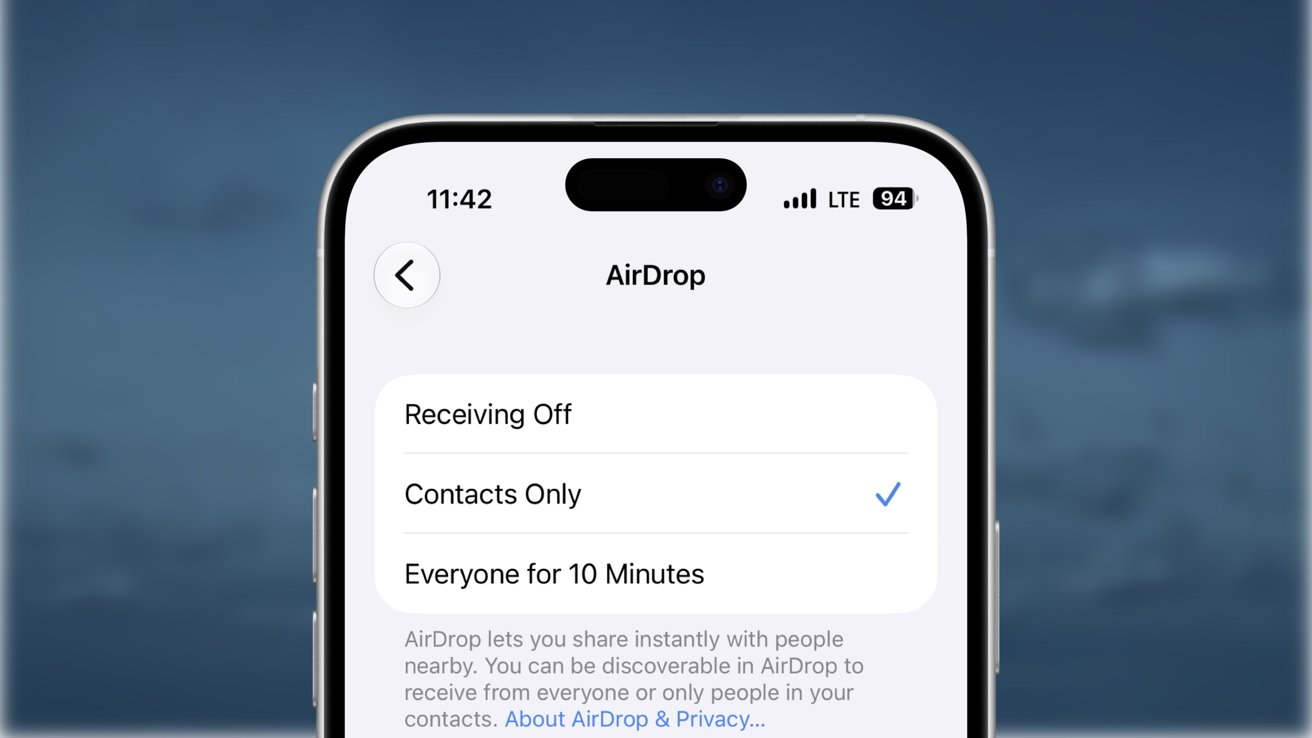
New AirDrop security flaws are significant, but aren't a giant threat
Nearby attackers can crash Apple's AirDrop before users see a file transfer request, temporarily disabling AirPlay, Handoff, Universal Clipboard, and other Continuity features. They're no threat, assuming you're configured properly.
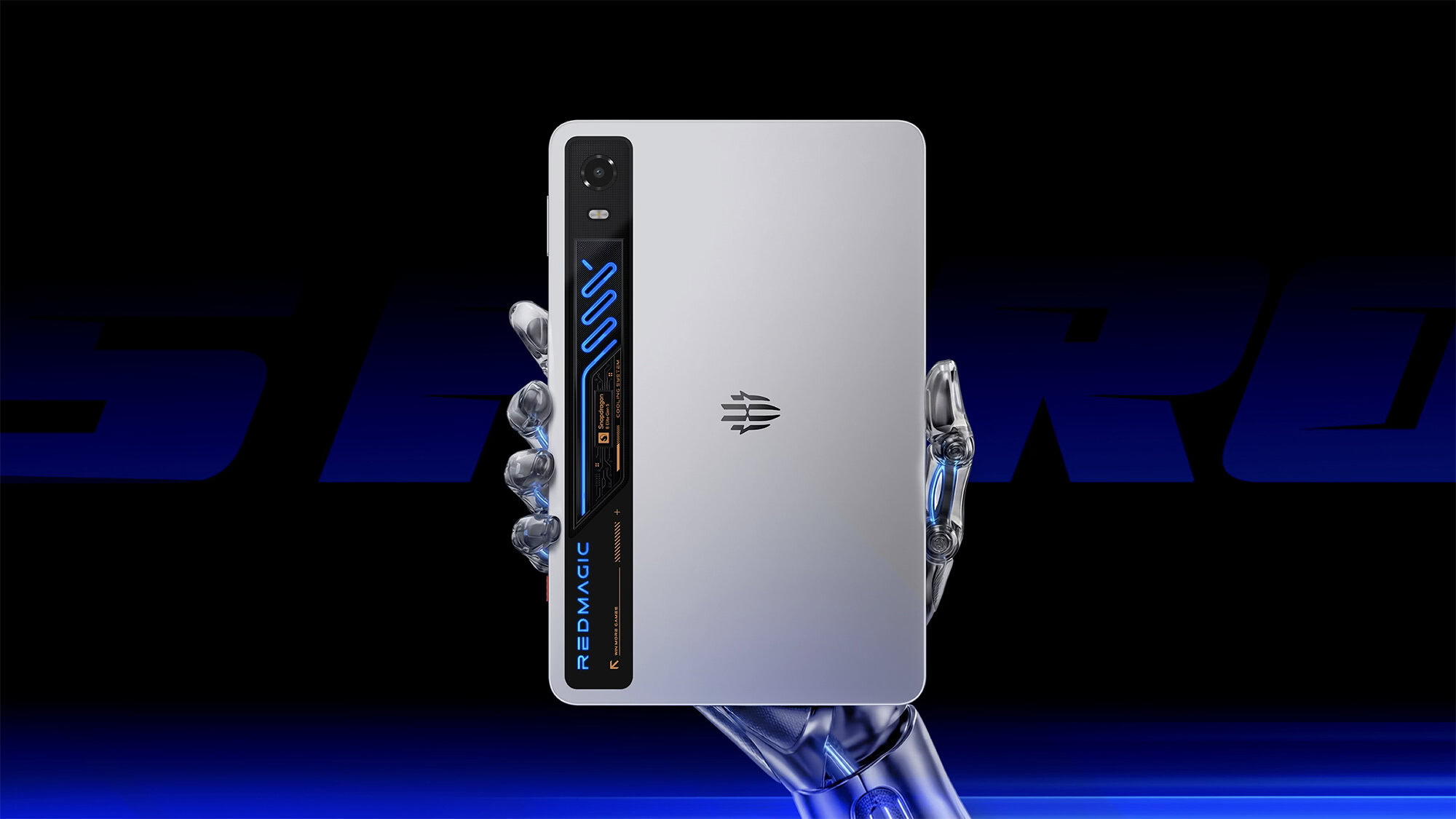
Liquid-cooled gaming tablet arrives with native PC emulation — and it’s going global soon
This gaming tablet brings RGB liquid cooling, dual USB-C, and native PC emulation to the table, and will launch worldwide very soon.

Open Source AI Agent OpenClaw Gets Native iOS App
Popular open source AI agent OpenClaw is expanding to the iPhone and iPad with a new native iOS app. OpenClaw for iOS can be used alongside an existing gateway as a secure node for chat, voice approvals, sharing, and device-aware automation. The iOS app replaces iPhone and iPad workarounds that involved using Telegram or WhatsApp for on-the-go access. OpenClaw is a self-hosted AI agent that runs on a Mac or PC.

'We're Done Paying for Executives' Failures' — Unionized Xbox Developers Hold Press Conference to Make Their Point as Microsoft Reportedly Readies Massive Layoffs
Unionized Xbox employees are pushing back against the company's looming layoffs and have outlined various demands.

Malicious Perplexity Chrome Extension Intercepted Searches and Address Bar Input
Microsoft says a fake Perplexity Chrome extension logged searches, IPs, headers, and address bar input before redirecting users.

Unionized Xbox Workers Demand Layoff Protections Ahead of Expected Cuts to Microsoft's Gaming Business
Unionized Xbox workers have demanded layoff protections ahead of what is reportedly a significant round of cuts to Microsoft’s gaming business.

Nex Playground Review
IGN snootily turned down an offer to review the Nex Playground around its 2023 release. And why not? It’s a casual games console from a company with no cachet in the space – a colorful little cube whose primary input method is your own body, via an ultra-wide camera lens on the front of the system. And yet, like the Wii before it, this underestimated machine (scoffed by elite gaming media types everywhere!) managed to outsell Microsoft’s Xbox consoles over the 2025 holidays. Were we, the gaming media, wrong? So now, here I am as one of IGN’s child-having freelance writers, with a review of the little teal and yellow cube that could, the Nex Playground.What You See Is What You GetEverything about the Nex Playground, from the gentle color palette of its cutesy, 3-inch-cubed form factor to its simplicity of setup and control, is aimed squarely at parents who desperately want their screen-addled kids to move. Its popularity shouldn’t surprise: it’s simple to use, there’s almost no setup or waiting for game installs and updates, and every single game on the console forces you to get up and do something, just the way so many games did on the Wii. (I, for one, remember hearing my mom, who hadn’t played a video game since the original Super Mario Bros. on the NES, holler “Steeeeeee-RIKE!” from the other room while she played Wii Sports bowling back in 2006. This is just a logical extension of that vibe.)Setup is a breeze. The Nex Playground comes in a neatly organized package, with numbered boxes indicating the order you should take things in. There are just four pieces: the Playground itself, an HDMI cable, a USB-C power cable (with a little magnetic puck attached to it that serves as a slap-on physical camera shutter), and a small remote. The Playground is super small and light, but the cables that come with it are very flexible and don’t shove the console around while you’re hooking it up the way a stiffer cable might.The first-time configuration is also quick, as long as you have your Wi-Fi password handy and don’t stop to read the lengthy privacy policy – which features a TL;DR at the top assuring you that the Nex Team, the folks behind the console, won’t sell your information. Next, you have to create a Nex Playground account and push through a splash screen offering you a subscription to the company’s $89 Play Pass plan. (We’ll get to that.) Then it gives you tips, like to not wear patterned clothing, or to set it up somewhere with a play area free of furniture you could bash into. Lastly, it’ll do a little test run to make sure where you’ve put it works for it. Once you’re through setup, there isn’t much you can configure from the settings menu found at the top of the Playground’s home screen. You won’t find HDR toggles or refresh rate and resolution options; what you get, visually, is just what you get. There are some things you can change, though: you can hide certain games or adjust the time zone, and you can decide how long you want it to idle before going to sleep, to save your precious OLED TV. You can also have it turn on or off your TV, using HDMI-CEC, when it’s powered up or goes to sleep.Things are similarly dull for the console’s specs, which are barely worth discussing, apart from the fact that it has 16GB of RAM, which is more than the 12GB inside the Nintendo Switch 2. That doesn’t actually mean anything about their relative performance, but it’s still a funny enough stat that I made sure to write it down. Either way, what it has is enough to run its Android-based Play OS, and that’s all it needs. Purchasing GuideThe Nex Playground is available just about anywhere you might expect: Amazon, Target, Walmart, Best Buy and more all have the system in stock. You won’t need extra accessories, but you should assume it’s $89 higher than the initial $299 price tag, because it’s not very useful without a Nex Play Pass subscription.Games and GameplayOkay, okay, the Nex Playground is technically a video game console, so let’s talk about the games. Its catalog of 50-plus games ranges from a tidy collection of thoughtful but simple originals (I use the term somewhat loosely) by Nex Team, some decent third party efforts, and rejiggered versions of casual smartphone games like Fruit Ninja that we’ve all been playing for well over a decade, to the sort of sloppy, licensed shovelware that plagued the Nintendo Wii, particularly near the end of its life. You use the Playground’s remote for setup, choosing games, and sometimes navigating in-game menus, but it’s all motion control when it comes to actual gameplay. The system’s motion tracking, which follows 18 points on your body, worked very well, even in the cramped space of my tiny apartment living room. I wish it had some form of depth detection besides its camera and onboard NPU, though, because I definitely kicked the built-in cabinet along one wall more than once because the game put an object inside of it. That wasn’t an issue most of the time, but it would’ve been nice if the games adjusted to my surroundings more (or at all).Without a subscription, you only get five games, including Fruit Ninja. If you want more – and after you’ve paid $300 for the dang thing, you will – your only choice is to shell out for Nex Team’s $89-per-year Play Pass subscription or a $49 3-month variant thereof. Doing so nets you around 50 more games, many of which are licensed from popular children’s programming, like Gabby’s Dollhouse: A-meow-zing Moves or Unicorn Academy: Friendship Adventures. As for whether any of this is fun, well, I’ll say up-front that if the goal is to give your kids something they might think is fun but that gets them to move around, the Nex Playground works – at first. My 8-year-old loved Fruit Ninja, and Whac-A-Mole when I first hooked the system up. Unfortunately, the novelty wore thin quickly, and within a couple of days, I was alone in my quest to see if the Nex Playground is worth your time and money. It’s a bad sign that my child lost interest so quickly, but no two kids are the same, and yours might react differently.So, how was the actual gameplay to me, a middle-aged man? Well, I guess I’ll tell you that through a series of mini-reviews of some of the few games I enjoyed.Homerun HeroesThere’s not much to Homerun Heroes: Starstrikers. It’s a first-party online matchmaking arcade baseball game wherein you play against random others, trying to get more and better home runs than them. It’s actually fun, too. After lightly customizing your anime avatar, its gameplay involves assuming a batting pose – with a prop bat, if you want, apparently – in front of the Nex Playground, ready to swing your empty hands or prop bat when the time is right.When the ball is pitched, a large circular outline appears onscreen and shrinks as it gets close. At the same time, an arrow underneath sweeps from pointing leftward to rightward, helping you to aim your hit – swing early, and it goes to the left; later, and it goes to the right. If you hit it just right, it’ll hit one of the multiplier bubbles floating over the stands. (The middle one is the highest, multiplying your score by five.) You need to keep your swings low if you want to get that home run. Finally, if you don’t swing low enough, you won’t get a home run. I got the hang of this game almost immediately, and my scores dwarfed those of my opponents. Who I assume were all small children. Fruit NinjaAh, yes, Fruit Ninja. It’s on everything. iPhones, the PS Vita, Xbox One, and even the Apple Vision Pro. I wasn’t surprised to find it here, and it’s pretty much the same game you’ve been playing for the last 16 years. (Yes, Fruit Ninja is almost old enough to vote in a US election. Which would be fraud! Arrest this man!) Anyway, I’m not as good at Fruit Ninja as I was at Homerun Heroes. Onscreen, you’re represented by a shadowy, pixelated silhouette with arms that end in glowing stumps. As you flail around, slashes follow; your goal, as ever, is to use those slashes to cut fruit in half as it’s flung up from the bottom of the screen, while also avoiding the bombs occasionally mingled in with them. Because I own a Vision Pro, I might as well tell you that the Nex Playground version plays a little better than that one, except that, since you’re translating the movement of your arms to a 2D space instead of a 3D one, it’s very easy to accidentally cut fruit at the wrong time or trigger bombs. But my kid, whose shoulder and neck aren’t currently recovering at a glacial pace from some unknown injury, loves Fruit Ninja. The game has a few modes of play, including Classic (three misses or a bomb and you’re out), Arcade (a timed, points-accrual fest), and Zen (in which you can’t lose and don’t have to deal with bombs if you don’t want to). Bowling Strike!If you’ve played Wii Sports (or its Switch variant), you’ve played Bowling Strike! It’s got a similar vibe, with subdued muzak-style tunes and the ambient sounds of a bowling alley playing in the background. Bowling Strike! is a little easier to just pick up and play, though, partly since you’re not picking even picking up the remote, nor do you have to get down the slightly awkward Wii Sports timing of holding down the B button and letting it go at the right time – you just raise your arm when you’re ready to hold the ball, then swing it down, back, and then forward. There’s a little of the subtlety of the Wii game, here. You can fling your ball at a left or right angle and even add spin, although I couldn’t get the hang of any of that. The game’s tutorial has you bend your arm left and right at the end of your follow-through to add spin, but it wasn’t very consistent, for me. I can’t say with full confidence that I don’t lack the coordination required to pull it off, though.Still, my kid and I had a good time with Bowling Strike! I definitely prefer playing Nintendo Switch Sports or Wii Sports, but at least virtual bowling on the Nex Playground doesn’t carry with it the risk of an unintentionally-weaponized controller destroying my TV.What Else Is There to Do?Nex Team included a handful of games that could appeal to older gamers, too. In its library, you’ll find a handful of fitness and dance games, one of which, Starri, you get for free and was both the most fun of the lot and the one that actually held my attention the longest. It’s clearly a simplified take on games like Beat Saber and Synth Riders, and gives you a choice of “Catch” or “Slash” when you start a session. I’ve played a lot of Synth Riders, so I gave Catch a go, first. It’s a lot different from Synth Riders, actually – instead of catching balls that fly at you from a synthwave hellscape, you mostly reach for spinning boxes as they appear on screen. Sometimes, blue or orange diamonds float in from the side at the bottom of the screen, toward a half-blue, half-orange circle that you rotate so that the colors match up when the diamonds reach it.. Slash mode felt closer to what I understand Beat Saber to play like (I’ve never played it) – you flop your arms in the direction indicated by blue and orange arrows flying at you, and slash blue and orange bars, making sure all the while that you’re doing so with the right color (your left arm is blue and your right is orange). Starri’s song library is mostly songs and artists I’ve never heard of, but Nex Team included a few fun licensed gets, like Shakira’s “Whenever Wherever” and the inevitable rickroll of Rick Astley’s “Never Gonna Give You Up.” The game was extremely forgiving when it came to timing and placing my hands in the right place, though, so it wasn’t hard to do well at.The only other dance game is Barbie Dance Party, which I was, uh, terrible at. Its song list includes some from the excellent Barbie movie, but playing them involves mirroring the onscreen moves of a Barbie character. The Nex Playground is remarkably good at recognizing your motions in this of all games, so when I repeatedly failed to strike poses properly or at the right time, it didn’t count. The game didn’t pull punches when it came to what it wanted me to do. It’s got the makings for a great party game, though – it’s approachable, doesn’t really punish you for mistakes, and it makes you look like a total buffoon in front of your friends. The fitness games are few and not all worth a go. Box Flow Fitness, for example, felt pretty disconnected from what I was actually doing, and its “trainer” was clearly (and annoyingly) voiced by an AI model. The goal is to punch flying objects with jabs, haymakers, and uppercuts, depending on the orientation of your target, and dodge angled bars by ducking or tilting your body. I’ve played the same game in VR, and hated it on the Nex Playground as much as I did on my Vision Pro.Family Fitness Challenge was better. This game fills the screen with the video feed from the Nex Playground’s camera and an overlay, at the bottom, of objects you’re expected to kick, dodge, or jump over. This one was more engaging, and definitely got my heart rate up as I tried to jump over hurdles – kicking them off screen when my timing was bad – or return soccer balls, ideally at floating onscreen targets. The Problem With the Nex PlaygroundI don’t mind the mostly shallow simplicity of the Nex Playground’s game catalog. Some of them are pretty fun, and I could see having a blast playing a number of them with friends. Unfortunately, the motion-based gaming will prove hard or impossible to play for some people who aren’t as mobile as I am, although to its credit, the system does at least have a filter for showing only games that use your upper-body exclusively, so people who rely on wheelchairs can still find something to do. Where the Nex Playground really gets annoying is monetization. Apart from the base five games to start, you can’t access any of the rest of the library without Nex Team’s Play Pass subscription – there’s no option to buy individual games at all. I could stomach being able to sign up for a month at a time at a slightly higher rate, but the best the company offers, besides its $89 annual fee, is three months of access at $49. That’s a bonkers amount of money to pay for a library with so little to keep you coming back to it. For any parents out there who’ve found their way to this review and are curious if the Nex Playground might give their kids a fun incentive to move around a little: Don’t buy it right away. Find a friend who already picked one up and schedule some time to go try it out. Really explore its library, ideally across multiple sessions. And if your kid likes it, consider how quickly in the past they’ve gotten over the novelty of a friend’s toy once they have one of their own. My own kid tried it at a friend’s, but having one in our own home almost immediately knocked the shine off of it, apparently.There are reasons to like the Nex Playground – its $300 price tag is a lot easier to stomach than the (soon-to-be) $500 that a Nintendo Switch 2 costs, and you don’t have to buy extra controllers. But it’s also the same price as the original Switch, a system with a deep library of games, including plenty of those that use the Joy-Con controllers’ built-in motion controls, which are easy to find used, at a nice price. Plus, you don’t need a subscription to have a great time for many years with a Switch – you can buy the games you want, and they’re yours.

Microsoft Removes 119 Edge Extensions That Hid Malware in Images and Fonts
Microsoft removed 119 StegoAd Edge extensions that hid payloads in image and font files to steal credentials and run ad fraud.

Hijacked npm and Go Packages Use VS Code Tasks to Deploy Python Infostealer
Researchers found hijacked npm packages and 16 Go packages using fake font files and VS Code tasks to deploy a Python infostealer.

Apple @ Work: Deploying a new PC made me appreciate everything Apple built into macOS
Deploying a new PC reminded me exactly why Apple Business Manager and zero touch deployment make macOS the absolute best choice for enterprise IT.

Save $50 Off the OG Xbox Elite Wireless Controller Series 2 With Component Pack for Prime Day
The best controller for Xbox and PC.
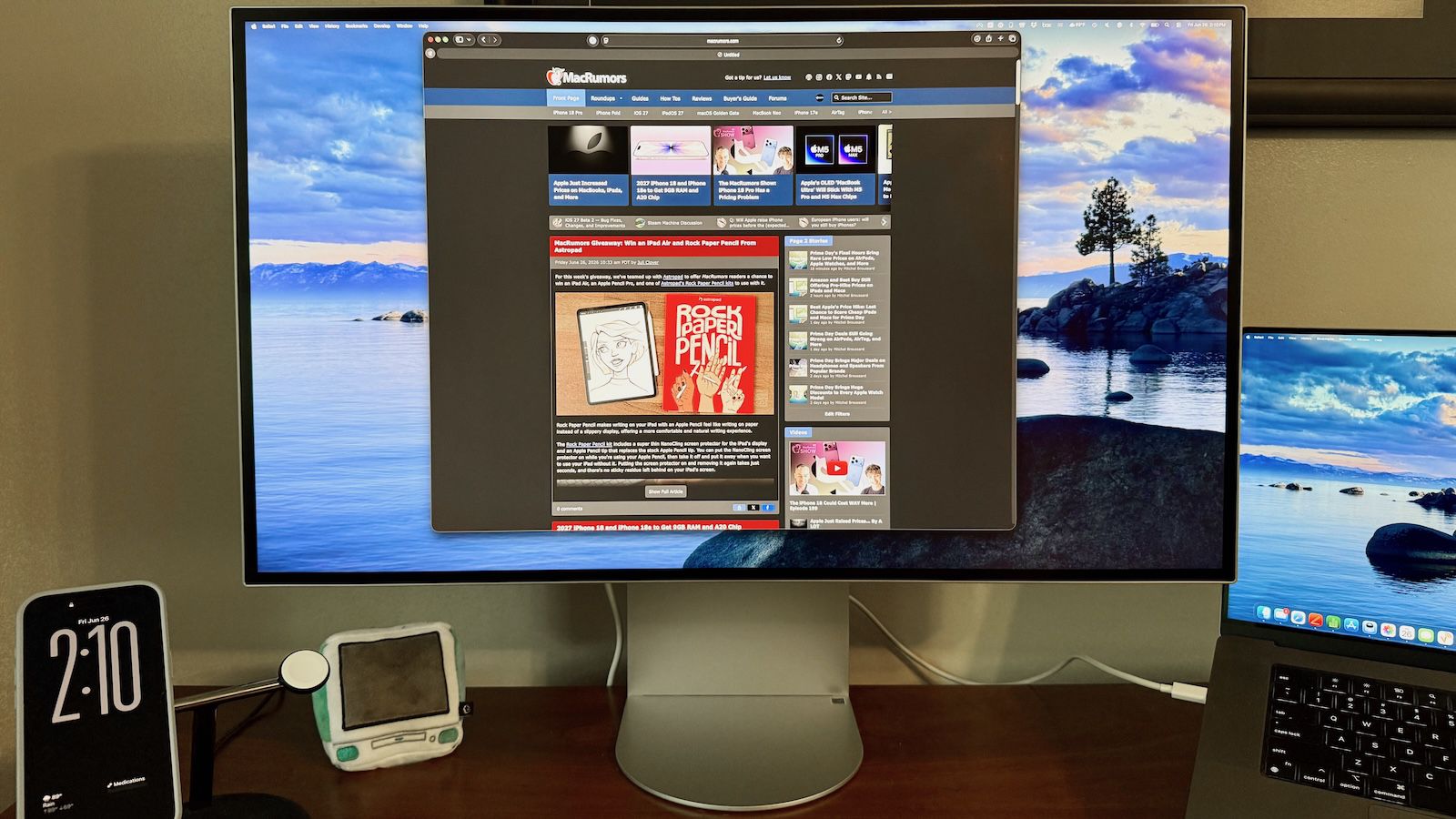
LG UltraFine 6K Review: A Premium 6K Display Designed With Mac Users in Mind
With Apple's discontinuation of the Pro Display XDR earlier this year, Mac users looking for a larger high-resolution display suddenly found themselves with fewer options on the market. Apple's current display lineup now includes its 27-inch Studio Display and Studio Display XDR, both of which offer excellent image quality and tight macOS integration, but neither provides the larger 32-inch form factor that some users prefer. LG's UltraFine 6K (32U990A) display helps fill that gap.

The Alienware Aurora RTX 5080 Gaming PC With 64GB of RAM and a 4TB SSD Drops to $3,029
Available in extremely limited quantities.

Assassin's Creed Black Flag Resynced: 8-Minute Gameplay Tour of Havana | IGN First
Join Assassin's Creed Black Flag Resynced lead level designer Jean Strachen as she takes you on an eight-minute gameplay tour of Havana. See what it looks like now in the gorgeous new remake that will be released for PC, PS5, and Xbox Series X|S on July 9.

Everything We Know About the Pokémon TCG Delta Reign
The clouds have parted, and The Pokémon Company International has officially revealed Delta Reign - the latest Pokémon Trading Card Game expansion set to launch on November 6, 2026, in the West. Following a surprise joint trailer, Mega Rayquaza is the star of this set, returning to the tabletop scenes after being last spotted in 2021 as part of the legendary Evolving Skies expansion.Delta Reign will arrive as the fifth, and likely final, main expansion of 2026. Right now, all fans have is a teaser trailer that gives a glimpse at the majestic Mega Rayquaza ex card. One interesting thing about this set was how it was revealed. Delta Reign is supporting a theory brewing in fan communities about a new era of global synchronicity. The official reveal of the set was slipped into a surprise reveal trailer alongside Pokémon TCG Pocket’s Rayquaza-themed Ruler of the Skies set, releasing on July 30. Storm Emeralda (Japan’s version of Delta Reign) releases on July 31. This is the first time that TPCi has synchronised a cross-platform release around a single Pokémon. With the 30th Celebration expansion releasing simultaneously globally on September 16, 2026, who knows what the future of Pokémon TCG has in store for us?Long-time fans of Pokémon TCG will remember how instrumental Rayquaza was in shifting the third-party resale market. The Rayquaza VMAX (Alternate Art Secret) from Evolving Skies is one of the most iconic cards of all time, currently sitting at a high of $1,044.19 on TCGPlayer. Fun fact - Rayquaza was the first Legendary Dragon-type Pokémon ever, and remains a fan-favourite to this day, so it’s no surprise that its cards can fetch a pretty penny. Karen of Johto’s Elite Four famously said: “Strong Pokémon. Weak Pokémon. That is only the selfish perception of people. Truly skilled trainers should try to win with their favourites”. My favourite Pokémon just so happens to be a meteor-mashing, giant, hyper-destructive Legendary that has terrorised nearly every format of competitive Poké Pokémon Omega Ruby and Pokémon Alpha Sapphire. Completely coincidentally, of course.The initial card tease of Mega Rayquaza ex has fans hyped, but deeply anxious about how they’re actually going to get their hands on the expansion. Over on r/PokemonTCG, one fan says, "I love Rayquaza but this set is gonna be insane to even find," while others openly worry that resellers will make the set entirely unaffordable for everyday fans. Fortunately, since the chaos of Ascended Heroes, The Pokémon Company International (TPCi) has actively implemented stronger defence over the last few months. To try and curb anti-social behaviour, bots and secondary-market price gouging, TPCi banned vendors from selling Japanese Pokémon Centre items, products over $1,000, or graded slabs at official Play! Pokémon events, such as the recent North American International Championships. Despite the inevitable secondary-market pressure, buying at Manufacturer's Suggested Retail Price (MSRP) is always the best bet. Not only is it better for your wallet, but it can also help tackle the price gouging we see in this hobby. TPCi hasn’t released any official information on Delta Reign’s pricing model yet, but we can expect it to follow in the expansions before - Booster Packs for $4.99 / £4.99, and Elite Trainer Boxes (ETBs) for $49.99 / £49.99.Want to secure your pre-orders now? No pre-orders have gone live for Delta Reign yet, but based on past release patterns, fans can expect pre-orders to open in late summer 2026, likely around early to mid-August. Keep this page bookmarked for more information as soon as we have it! Given that Rayquaza cards have some of the highest non-vintage price ceilings in the hobby, and given what we know about the popularity of Pokémon TCG even when it’s not a beloved Legendary as the mascot, initial allocations are bound to sell out the moment they drop. You’ll definitely want to lock this one in before it’s too late.To boost your chances of securing Delta Reign at baseline MSRP, you should keep close tabs on standard flagship retailers like the Pokémon Centre, GameStop, Best Buy, and Amazon. If you want to try your luck at local card shops on release day, it’s best to get in touch with your Local Game Store (LGS). As for when pre-orders will go live, March’s Chaos Rising broke traditional drop windows and surprised buyers with pre-orders dropping a few days out from launch. While this could happen with Delta Reign, it’s widely expected that pre-orders will surface a few weeks after the late-summer rush. If you’re too late to secure a pre-order, it’s not the end of the world. Hit up your local prerelease event, likely running from October 24 to November 1st, 2026, to get a Build & Battle Box two weeks before the official retail release. Each kit comes with a 40-card ready-to-play Evolution deck, an exclusive stamped black-star promo card and four Delta Reign booster packs. Best of all, you can play early!For hot deals, active links, and news the second allocations go live, turn on your notifications for IGNDeals on X and keep this hub bookmarked. Joining Discord channels or following social media accounts dedicated to TCG restocks can also help you spot listings right away.Sara Heritage is a freelance journalist for IGN, specialising in Pokémon TCG. When she's not gaming, you’ll probably find her building yet another LEGO set she absolutely did not need, or chaining ranked matches in Pokémon Champions.