AI August 2026
Global headlines curated by our intelligent agents.
Latest News

The Blood of Dawnwalker PC Settings Guide: Maximize Your PC Performance By Tweaking These Options
While 2026 has so far been packed with incredible PC games, The Blood of Dawnwalker was the one that I was looking forward to the most. Not only does it come from a game director with an incredible pedigree, but ever since system requirements were first revealed in February, I knew that this game would absolutely punish my PC – and I’m into that. Luckily, Rebel Wolves has since lightened the system requirements a bit, now only recommending an RTX 4070 Ti for 4K 60 fps gameplay, rather than the RTX 5090 I thought it was going to require at the beginning of the year. And now that I’ve had a chance to play it, I’m pleasantly surprised at its performance, even if the visuals are a little mixed. Just like a lot of RPGs of this scope, much of what makes The Blood of Dawnwalker so beautiful is its environments. Just walking through the town and the forest in the opening chapter is jaw-dropping, with realistic foliage and water. The character models don’t quite reach the same fidelity, but I’m ok with that when just walking through the world looks as good as it does. The Blood of Dawnwalker PC Settings ExplainedWhile The Blood of Dawnwalker is available on Xbox Series X and PlayStation 5, PC is where it truly shines. This game has pretty much every graphics option I’d like in a modern game, and avoids clumping a bunch of graphics techniques into one banner. The game is quite heavy to run maxed out, but there is genuinely enough room to dial it in for better performance, pretty much whichever hardware you’re playing it on. Keep in mind, though, that The Blood of Dawnwalker is running on Unreal Engine 5. The game handily avoids the kinds of problems that have plagued Star Wars Zero Company and Halo: Campaign Evolved, but it is pretty heavy, especially on your CPU. The game will still run on a handheld, technically, but not particularly well. I played it a bit on the Lenovo Legion Go 2 at the lowest settings at 900p, and got around 24 fps indoors. So, I’d stick to your main tower for this one. But even on a tower, Blood of Dawnwalker can be very demanding. At 4K with DLSS set to Quality and on the Ultra preset, the RTX 5090 gets anywhere from 70–90 fps before frame generation. It is incredibly smooth, but that’s the type of performance you’d expect from an RTX 5090. Here's my list of recommended graphics settings, so you can spend less time wondering what each option does and more time living your best vampiric life. Shadow Quality: This one’s pretty simple and just changes the resolution and accuracy of shadows. This game has a lot of dynamic lighting, though, and this is probably one of the first settings I’d turn down to improve performance. But, it is a game where shadows do add a lot to the atmosphere, so you’ll have to weigh the importance there. Mid-Range PC: High; Handheld: LowLight Quality: It’s hard to tell from looking at this game’s gorgeous lighting, especially in the mornings and evenings, but there is no ray tracing on offer here. Still, this setting will change how detailed lights are, and the intensity of effects like global illumination and diffuse lighting. Turn it down if your performance is struggling. Mid-Range PC: High; Handheld: LowReflections Quality: I’ll admit that I’m only a couple of hours into this absolutely massive RPG, but at least in my time with it, there aren’t that many reflective surfaces. Still, this setting will change how detailed screen space reflections are, so turn it down if you start getting performance drops around water or other reflective surfaces. Mid-Range PC: Medium; Handheld: LowPost-Processing Quality: You’ll be able to toggle individual post-processing features on or off further down in the settings, so this changes how good all of those effects look. I’d keep this up on higher settings if you like a cinematic aesthetic, but you can effectively turn it off if you don’t really care about bloom or motion blur. Mid-Range PC: High; Handheld: LowTexture Quality: This mostly affects how much VRAM the game is going to eat up. I’ve spent most of my time in this game with this maxed out, and the game ate up about 10–12GB of VRAM. So I’d stick to Ultra on 16GB plus, High on anything from 8–12GB and medium or low if you have less than 8GB of VRAM. This should be one of the first things you turn down if you start running into stuttering. Effects Quality: This mostly affects particle effects, and there are surprisingly a lot of them in this game. This is going to be heavier on your CPU than anything, so I’d turn this down if you’re getting bottlenecked there. Mid-Range PC: Ultra; Handheld: LowShading Quality: This is just another way to scale the lighting in Blood of Dawnwalker. I’d turn this down early if you’re struggling to hit 60 fps. Mid-Range PC: High; Handheld: LowFoliage Quality: Simply put, foliage in this game is gorgeous, almost at the same level as something like Assassin’s Creed Shadows. But, if you notice your performance start to tank when you’re running around in the wilderness, you should probably drop this to a lower setting. But, really you should at least try running it a higher setting just to see what it looks like. Mid-Range PC: Medium or High; Handheld: LowDetail Quality: Maybe it’s just me, but having the option to tweak “Detail Quality” feels a little like changing “Detail Details.” Regardless, this changes a lot of volumetric effects like fog, along with destructible objects. I’d turn this down if you’re running into CPU issues. Mid-Range PC: Medium; Handheld: LowVolumetric Quality: This setting also changes volumetrics, but focuses more on their resolution. I’ll always turn volumetrics down before anything else, and that doesn’t change in Blood of Dawnwalker. Mid-Range PC: Medium; Handheld: LowUpscaling Technology: Unlike a lot of other Unreal Engine 5 games, Blood of Dawnwalker doesn’t try and shove TSR down your throat. Instead, Blood of Dawnwalker supports all three major upscalers from GPU manufacturers and the one you should choose depends on which graphics card you’re using. Nvidia users should use DLSS, AMD users should use FSR and Intel users should use XeSS. Upscaling Mode: Because this game is hard to run, I’d go with upscaling on performance mode if you’re struggling to hit 60 fps. However, keep in mind that performance mode will look pretty rough on lower resolutions, so you might want to lower lighting settings first. Frame Generation: This uses AI to insert interpolated frames in between rendered frames. This will nearly double your frame rate, but will increase latency by a little bit. But because this isn’t a competitive game, and isn’t even that fast-paced, I’d recommend just turning this on, especially if you have a high-refresh rate gaming monitor. Motion Blur: This is just a toggle to either enable or disable motion blur. I hate motion blur, you might love it. It’s really up to you. It won’t affect performance all that much either way. Bloom: This is another toggle, but this time for Bloom. These are the little rays of light that you sometimes see coming off of the sun or something. This will affect performance a bit, so I’d turn it off if you’re playing on a low-end GPU. But for most people on a modern gaming PC, it probably won’t make that much of an impact. Chromatic Aberration: This is an effect that tries to mimic a camera lens. I don’t notice much of a difference whether its enabled or not, so I’d try it each way and see what you prefer. This won’t affect performance much if at all. Depth of Field: This will blur distant objects, especially in cutscenes. This is a nice effect, and I usually leave it on, but turn it off if you want everything to be crystal clear. Jackie Thomas is the Hardware and Buying Guides Editor at IGN and the PC components queen. You can follow her @Jackiecobra

Codex report: Four months of building joy on my Mac with ChatGPT
9to5Mac is brought to you by Memoket: The Memoket Gem is an 11g AI wearable that slots beside your Apple...

New evidence shows OpenAI's trade secret theft & destruction of evidence, says Apple
Apple has been urging the court to require expedited discovery, and information discovered on Chang Liu's work MacBook suggests OpenAI is actively destroying evidence.

Apple Says Former Engineer Used Stolen Trade Secrets at OpenAI, Taught AI Agent to Run Them
Apple today submitted new evidence in its lawsuit against OpenAI, with the hope that the new information will persuade the judge to grant an expedited discovery process. Apple filed a theft of trade secrets lawsuit against OpenAI employees Chang Liu and Tang Tan in July, accusing them of using multiple methods to steal data from Apple. Liu kept an Apple-issued MacBook after he left for OpenAI, and Apple got it back after the lawsuit was filed.

The 2026 65" LG Evo C6 4K OLED TV Drops to $1,199.99 During the eBay Labor Day Sale
LG sells the most OLED TVs, which shouldn't come as a surprise to anyone. Usually the current year model is quite expensive and I typically recommend getting the prior year model for significant cost savings. This time around, however, there's a great deal on a 2026 LG OLED TV that you might not want to miss.For a limited time, eBay via Electronic Express has dropped the price of the 2026 65" LG Evo C6 4K OLED TV to $1,199.99 with free delivery after 20% off coupon code "LABORDAY20". Electronic Express is an authorized LG reseller so you get the 1 year warranty. That's by far the lowest price I've seen for this TV (everyone else has it "on sale" right now for $1,500)2026 65" LG Evo C6 4K OLED TV Drops to $1,199.99More sizes are also on sale. C6H models (77", 83") have a Tandem OLED panel.83" (C6H) model for $3499.9977" (C6H) model for $1,999.9955" model for $1,039.9942" model for $879.99The C6 is LG's current 2026 model in the LG's C-series OLED TV lineup. The C6 improves upon last year's C5 model with upgraded 165Hz max refresh rate (vs 144Hz) and a new Alpha 11 Gen 3 processor with better AI processing.LG's C-series OLED TV in general has been our favorite TVs for console gaming for many years thanks to its outstanding image quality, low input lag, and high refresh rate. This is one of the best TVs you can get for streaming 4K HDR content in its intended glory. It boasts the near-infinite black levels, near-infinite contrast ratio, and near-instantaneous response times you'd expect from any OLED TV. It's also equipped with LG's proprietary Evo panel, which is significantly brighter and offers a wider color gamut than traditional W-OLED TVs.The C6 is also equipped with modern gaming features that make it a perfect complement to current generation consoles like the PlayStation 5 and Xbox Series X, including a native 120Hz panel that can be pushed to as high as 165Hz, HDMI 2.1 inputs, variable refresh rate and auto low latency mode.How to Follow IGN Deals RecommendationsThe IGN Deals team has over 30 years of combined experience finding the best discounts and preorders available online. If you want the latest updates from our trusted team, here’s how to follow our coverage:Sign up for our IGN Deals NewsletterSet IGN as a preferred source in GoogleFollow us on social mediaIGN Deals on XIGN Deals on InstagramIGN Deals on FacebookIGN Deals on TiktokEric Song is the IGN commerce manager in charge of finding the best gaming and tech deals every day. When Eric isn't hunting for deals for other people at work, he's hunting for deals for himself during his free time.

Apple reveals ‘shocking evidence’ from ex-employee’s MacBook in OpenAI suit
Apple has filed a new document in its ongoing lawsuit against OpenAI as it continues to push for expedited discovery....
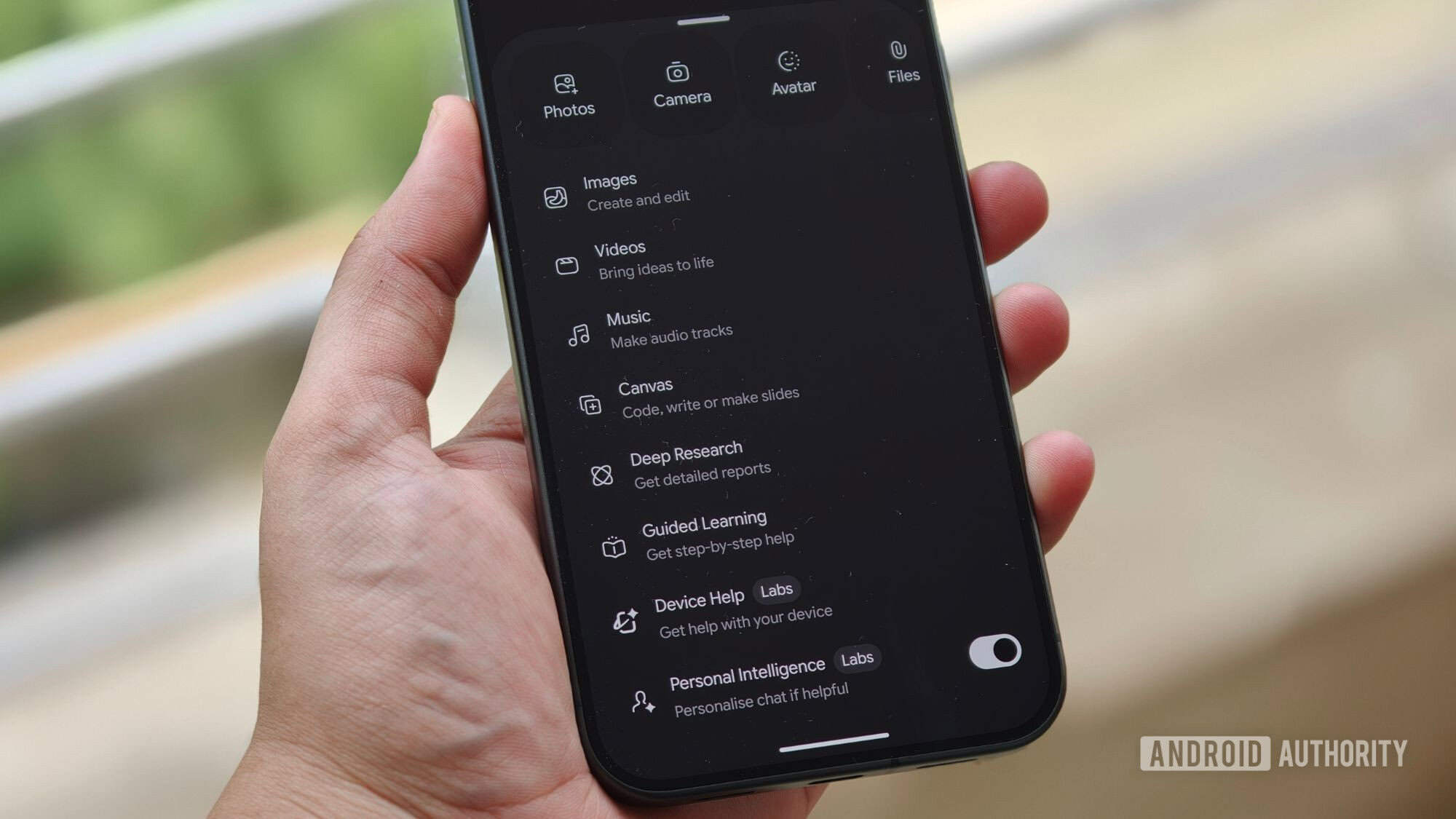
PSA: Gemini can adjust system settings on any Pixel running Android 17
A Gemini feature that lets the AI adjust system settings on Android is coming to more phones soon, a Google employee has shared.

AirPods With Cameras Could Bring Improved Spatial Audio Head Tracking
Apple's AirPods with cameras could improve spatial audio on the iPhone and other Apple devices by detecting the position of the display the wearer is looking at. Details on the capability were found in macOS Tahoe 26.7 code, and shared on the MacRumors forums by member Mactracker. Sensors in the current AirPods power a spatial audio head tracking feature, and cameras could take that further.
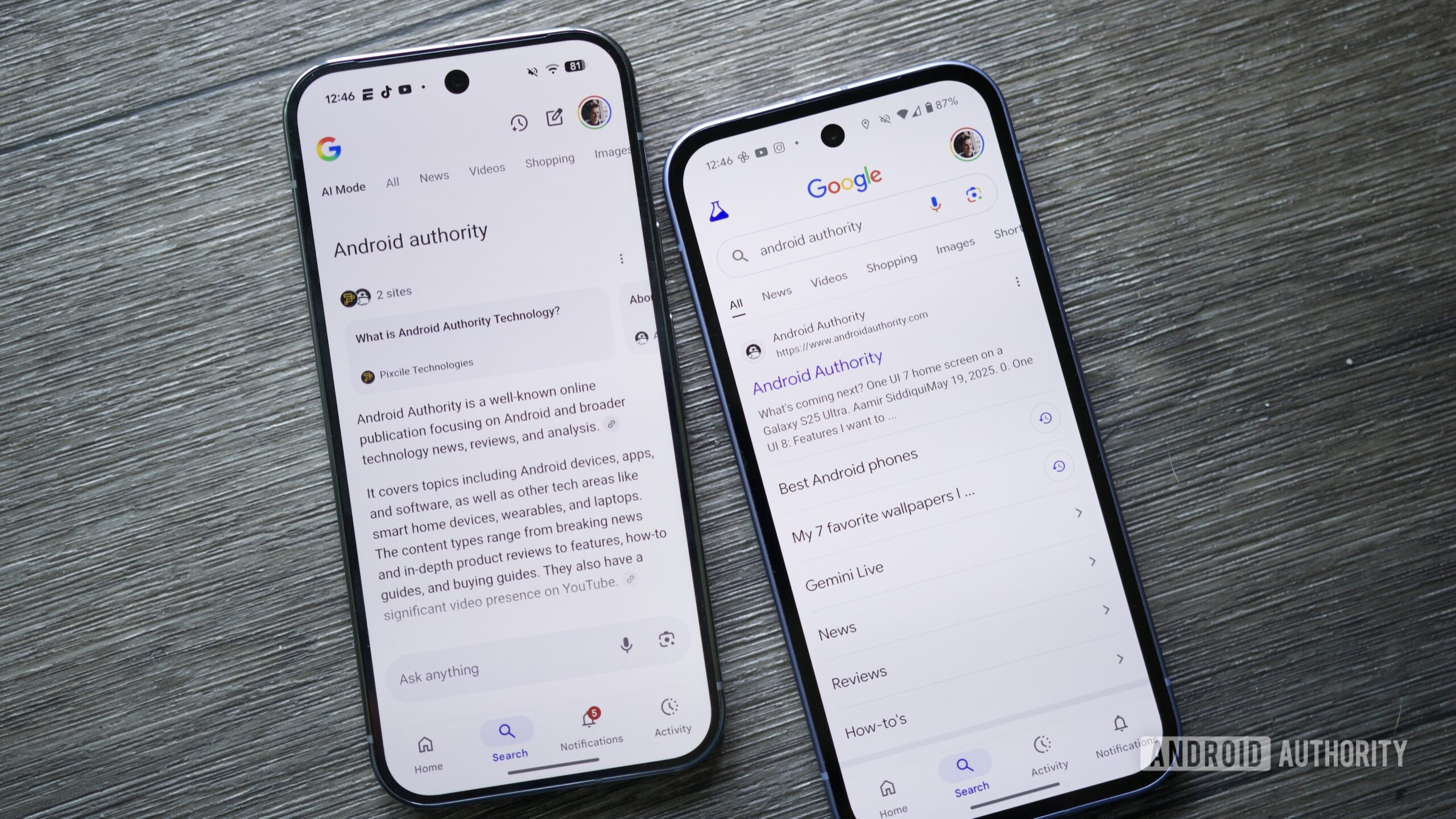
Google finds another way to push Search users to AI Mode
Google Search has started showing longer AI Overview summaries for some queries on desktop, including a link to AI Mode.

AI needs more Macs, but not for the reason you might assume
The Mac isn't selling as fast as Apple can make them because of artificial intelligence needs as some would have you believe, but AI is giving businesses plenty of reasons to buy more of them.

Apple Releases macOS Golden Gate Beta 8
Apple today provided developers with the eighth beta of macOS Golden Gate, with the update coming a week after Apple seeded the seventh beta. Developers can download macOS Golden Gate by going to System Settings > General > Software Update. Beta Updates will need to be enabled, and a free developer account is required. macOS Golden Gate includes multiple design improvements.
Apple Seeds Eighth iOS 27 and iPadOS 27 Betas to Developers
Apple today seeded the eighth betas of iOS 27 and iPadOS 27 to developers for testing purposes, with the update coming one week after Apple released the seventh betas. Registered developers can download the betas from the Settings app on the iPhone or iPad by going to the General section and selecting Software Update. iOS 27 introduces Apple's smarter version of Siri, Siri AI.

iOS 27 beta 8 now available as Apple tests major Siri AI upgrade
Apple has released the eighth iOS 27 beta for developer testing. iOS 27 beta 8 continues Apple’s summer beta cycle...

Apple Seeds watchOS 27 Beta 8 to Developers
Apple today seeded the eighth beta of watchOS 27 to developers, with the update coming a week after the launch of the seventh beta. The beta can be downloaded through the Watch app on the iPhone with a free developer account. The Apple Watch will need to be on the charger, connected to Wi-Fi, and have a battery level of 50 percent or above for new software to be installed. watchOS 27 introduces Siri AI, the smarter, more capable version of Siri.

Apple Seeds Eighth visionOS 27 Beta to Developers
Apple today provided developers with the eighth beta of an upcoming visionOS 27 update for testing purposes. The beta comes a week after Apple released the seventh beta. visionOS 27 can be installed by opening the Settings app, going to Software Updates, and opting into Beta Updates. visionOS 27 introduces Siri AI, the smarter and more capable version of Siri that's similar in capability to chatbots like ChatGPT and Claude.

AI could could cause global economic downturn, Andrew Bailey warns G20
The governor of the bank of England warned of AI's “volatility” caused by energy shocks from the US-Iran war.

Debian won’t ban AI code from its Linux distribution
Debian’s the latest Linux distro to allow AI.

New York Governor Kathy Hochul thinks AI should be ‘less evil’
The one thing everyone seems to agree on.

⚡ Weekly Recap: Chinese Spy Proxy, AI Agents Go Off-Task, Router Backdoors and More
This week’s cybersecurity recap covers AI agents breaching Hugging Face, Chinese spy proxies, router backdoors, PaperCut attacks, and banking malware.

ChatGPT to face tougher regulation in the EU
The EU now considers ChatGPT, Reddit, and Roblox ‘Very Large’ platforms.

Instagram cracks down on AI accounts pretending to be human
Give us a proper AI filter, you cowards.

CarPlay keeps getting better with three recent exciting app updates
CarPlay is about to get even better with iOS 27 in September. New features including a dedicated Siri app and...
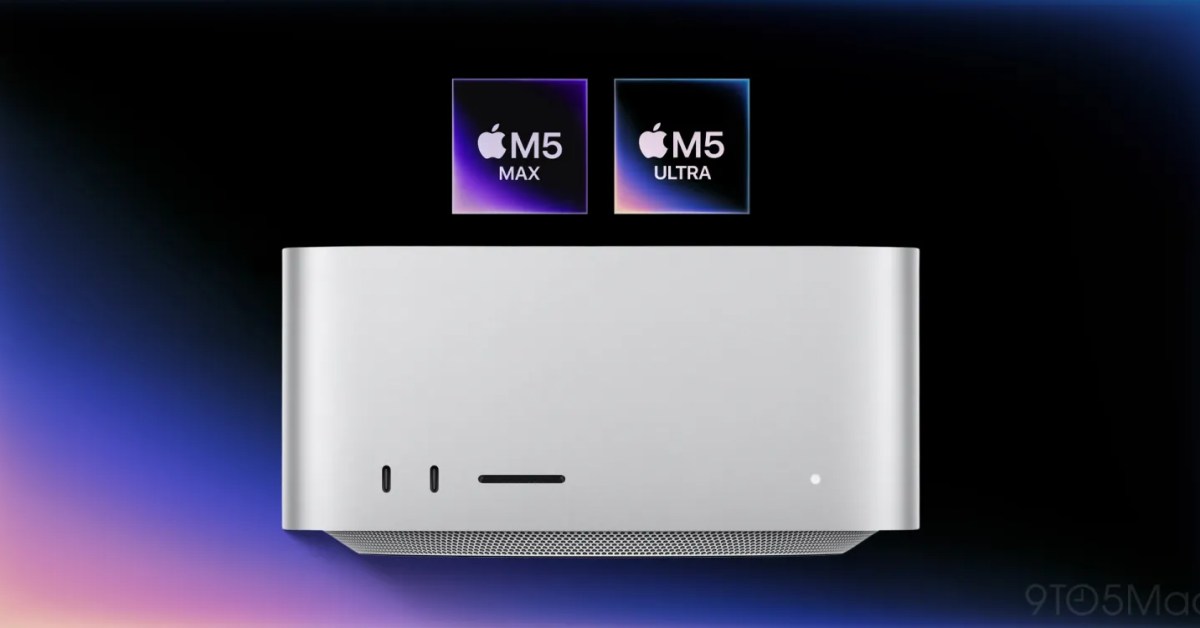
Unusual timing of Mac mini and Mac Studio updates all about AI, claims report
Apple surprised many when it quietly announced updated Mac mini and Mac Studio models shortly before its September event. We...

Aurora Ransomware Operators Use Cursor AI in Attacks Against 10 Targets
Aurora ransomware operators used Cursor Agent for hands-on exploitation against 10 targets after receiving credentials or an existing route.